

Vibe Coding for VR Prototyping
At JetStyle, we’ve been building XR products for business for the last 9 years. https://jet.style/xr
Over that time, one habit has stayed the same: when a new tool looks genuinely useful, we try to understand where it can improve the workflow.
Not every new technology deserves a permanent place in production. But some of them help teams move faster, test ideas earlier, and avoid unnecessary effort. That is exactly why AI-assisted prototyping has become interesting to us.
In this article, our Art Director Kostya Ostro shares how he uses vibe coding to prototype VR and mixed reality mechanics faster — and why this approach is especially practical for early-stage XR work.
We’ll use one example from our internal product development. We’ve been working with BIM VR BIM VR — a toolset for collaborative work with building information models in immersive environments. https://jetxr.style/bim-vr
In BIM VR, spatial interaction and alignment need to be tested in a realistic way before moving further.
How Vibe Coding Is Used for VR Prototype Development
Current AI coding tools can generate small interactive prototypes quickly enough to make experimentation easier. Even a free subscription is already enough for simple tests.
For designers, that creates a useful middle ground between a static mockup and full development. Instead of discussing an interaction in theory, you can often build a lightweight prototype and see how it behaves in space.
That matters a lot in VR. Spatial interfaces are hard to judge from flat screens. The mechanics may depend on scale, distance, movement, controller input, or the user’s position in the scene. Something that looks clear in a wireframe can feel awkward once it is placed in 3D space.
Read how we optimize UI for VR https://jet.style/articles/optimizing-ui-design-for-vr
That is why fast prototyping helps teams make better decisions earlier.
JetStyle’s Example: BIM VR
One of the tasks in the process of BIM VR development is aligning a digital 3D model with a physical object in mixed reality. For example, a user may need to stand in front of a real construction element and see how ventilation, wiring, or other systems relate to it.
The interaction needs to feel clear and usable. In Kostya’s prototype, the idea was to align a model using two points:
- the user marks two points on a real object;
- those same points are matched in the drawing or model;
- the model is then overlaid in the correct position.
This kind of mechanics is difficult to evaluate from static screens alone. You can describe it, sketch it, and discuss it, but until you try it in a spatial scene, it is hard to know whether it actually feels understandable.
How JetStyle Built Prototypes Before Vibe Coding
Earlier, there were usually two paths. The first was to keep the discussion abstract for a while and postpone validation until development started.
The second was to prototype the mechanics inside a heavier engine-based workflow. That can work well, but it also means more setup, more production effort, and more time spent on a hypothesis that may still change.
For early checks, that is often more than the task really needs.
How MVP Building Changed
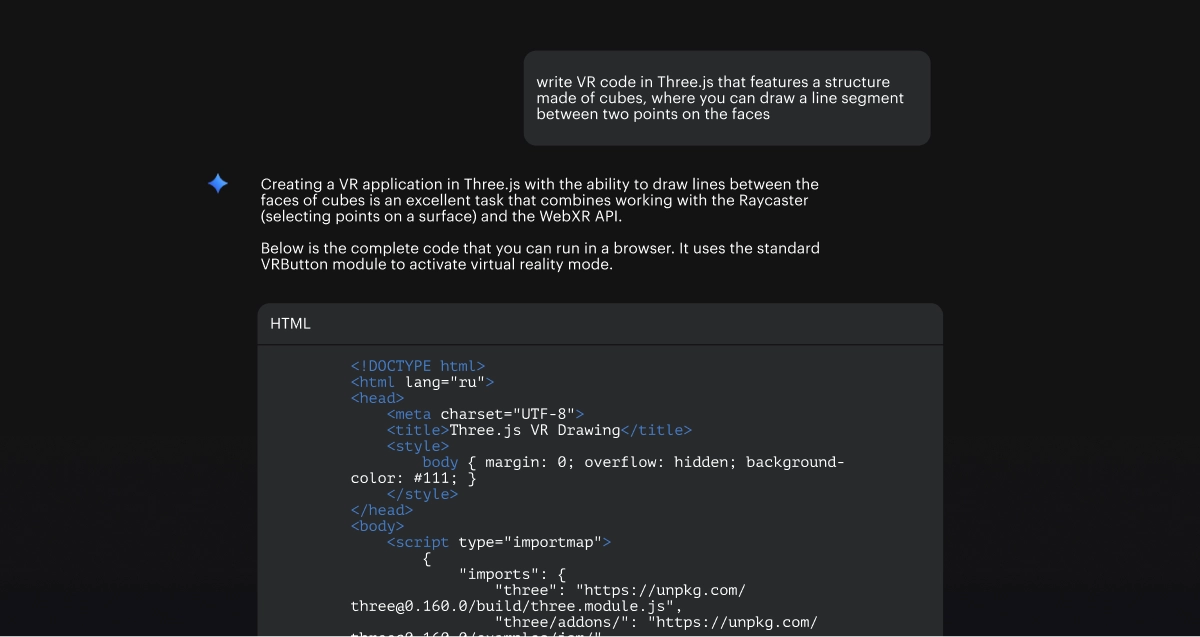
Instead of going through a full setup, Kostya used an AI coding assistant to generate a lightweight prototype in Three.js.
That is an important part of the workflow: for many early VR tests, you do not necessarily need to begin with a game engine. Three.js is often enough to prototype a mechanic, put it in a browser, and test it as a WebXR experience.
This makes small experiments much easier to start. A designer can take an idea such as “make a VR prototype where a user selects two points to align a model” and get a working first version quickly. It’s really something specific enough to test the logic of the interaction.
Why Three.js
Three.js is a web library for displaying 3D scenes in the browser. For this kind of task, it is useful because it keeps the setup relatively light and the feedback loop short.
In practice, that means:
- less overhead for testing one feature;
- an easier path to browser-based sharing;
- a practical way to prototype WebXR experiences.
For designers, that also lowers the barrier to trying things out directly.
Pipeline
It’s simple:
- Generate the first version with an AI assistant, often in Gemini.
- Open and refine the code in VS Code.
- Create or update the repository through GitHub Desktop.
- Deploy the prototype via Vercel.
- Open it in the browser and test it in VR.
In short:
AI assistant → VS Code → GitHub Desktop → Vercel → browser-based VR test
How Vibe Coding Changes Process
The main benefit is not that AI replaces development – it does not. But it does offer a faster way to validate small mechanics before a team commits to a larger implementation.
That can include:
- spatial alignment tools;
- controller interactions;
- object placement behavior;
- simple 3D UI logic;
- mixed reality overlays;
- basic game-like experiments.
For this level of testing, the effort can drop significantly. Instead of turning every new idea into a full production task, the team can first check whether the interaction is worth developing further.
That usually means faster hypothesis testing and more careful use of budget.
.webp)
Limits of Vibe Coding
This approach also has clear limits. As soon as the prototype becomes more complex, the code becomes harder to control. Bugs accumulate, and technical knowledge starts to matter more.
So vibe coding is not a shortcut to a finished XR product. But it is very useful before that point — when the task is to test a mechanic, understand whether it works, and decide whether it deserves deeper production.
Vibe Coding Beyond BIM VR
This method can be used for game-like interaction tests, spatial UI experiments, or rough mechanics that would otherwise stay at the discussion stage for too long. Instead of trying to imagine whether a concept might work, a team gets the chance to try it. That is often enough to move a conversation forward.
What Vibe Coding Changes for Designers
Another interesting part of this shift is that designers are getting closer to code.
Not necessarily as full-time developers, but as people who can now build and test small interactive ideas more directly.
That shortens the distance between concept and validation, which is valuable on its own.
More about AI for design https://jet.style/articles-ai
How Clients Benefit With Vibe Coding
For clients, the benefit is fairly simple.
When a team can prototype earlier, it becomes easier to test ideas before committing to a larger scope. That helps reduce unnecessary work, validate mechanics sooner, and reach MVP decisions with less friction.
This fits the way we generally like to work: in shorter iterations, with room to test assumptions before turning them into a full production plan.
If you have an XR, VR, or mixed reality concept that you want to test before investing in full development, we can help you turn it into a working prototype quickly.
That makes it easier to check ideas early, shape the right MVP, and spend time and budget more carefully.
If you want to test an XR mechanic or interaction concept, let’s prototype it.