
Designing Interfaces for Operators in LBE VR
At JetStyle, we’ve spent 10 years developing XR experiences, including award-winning location-based entertainment (LBE) projects across Europe. Together with our partners, The VR Boys, we help clients launch these attractions — designing not only the virtual experience, but also the tools that make it work on-site.
Operators need to start sessions, manage scene transitions, and guide visitors without slowing things down. An intuitive control interface helps reduce training time and keep the attraction running smoothly.
In this article, Alex Perminov, VR Designer at JetStyle, shares how we designed the operator interface for an upcoming action-adventure LBE VR attraction launching in the Netherlands. We’ll look at how we mapped the workflow, adapted the interface for a tablet, and used AI to explore design solutions.
Why LBE VR Needs an Interface for Operators
Visitors see the virtual world, but operators manage everything happening around it. They need to prepare sessions, monitor progress, and help visitors when necessary.
For this upcoming attraction, we started by discussing the process with the project’s developers. Before designing screens, we mapped the session flow, what the operator needs to do, and which functions are necessary.
This helped us question existing controls, too. For example, a quality setting seemed unnecessary if the required settings were already predefined.
The key takeaway: understand the operational workflow before deciding which screens and controls to build.
Adapting the Interface for a Tablet
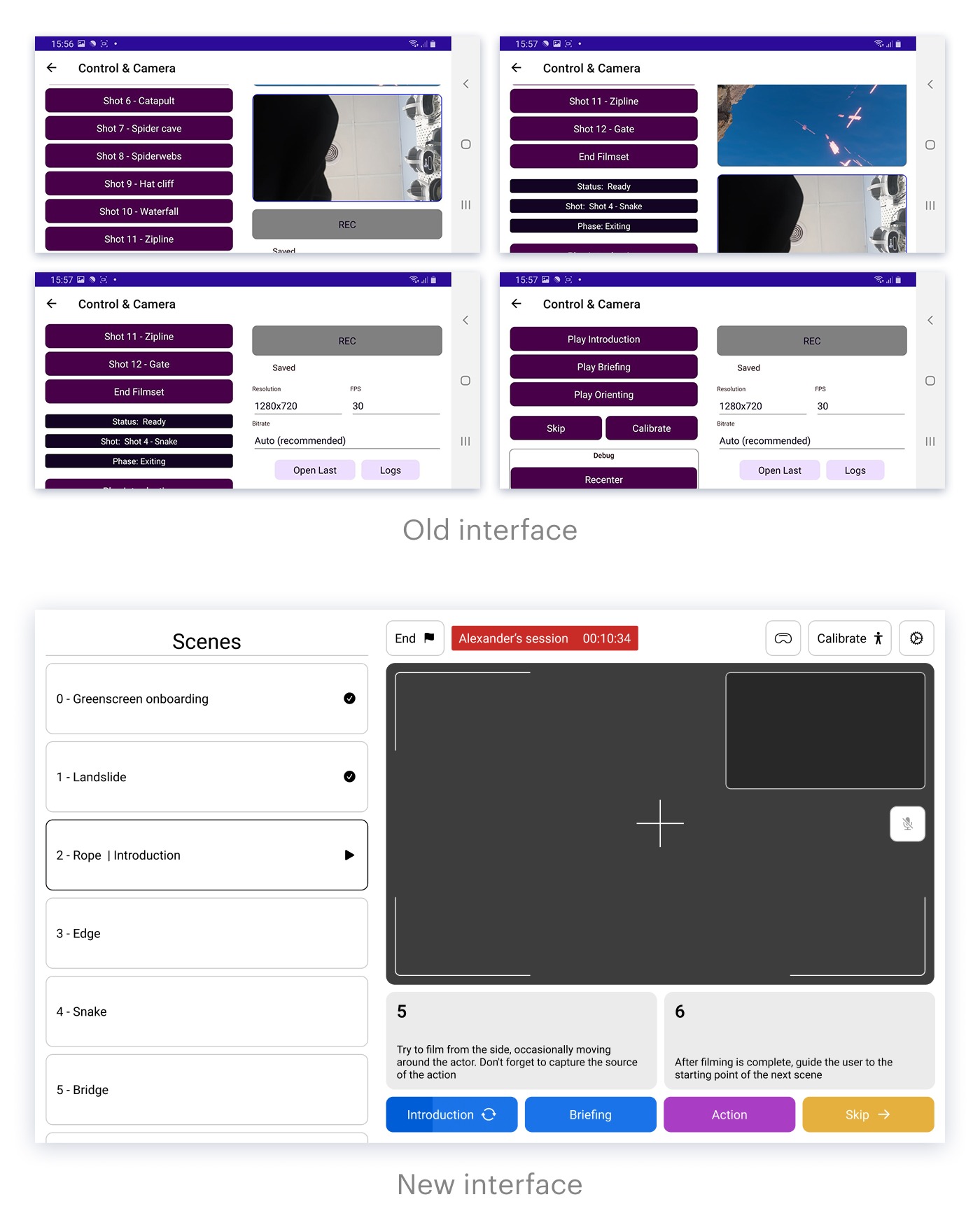
The application was designed for a horizontal tablet operated with both hands. This shaped the layout: scene selection sits on the left, while session controls are on the right.
We also moved the End Session button to the top of the screen, away from the lower area where accidental touches are more likely. The monitoring window showing the VR experience was enlarged compared with the previous version, giving operators a better view of what is happening.
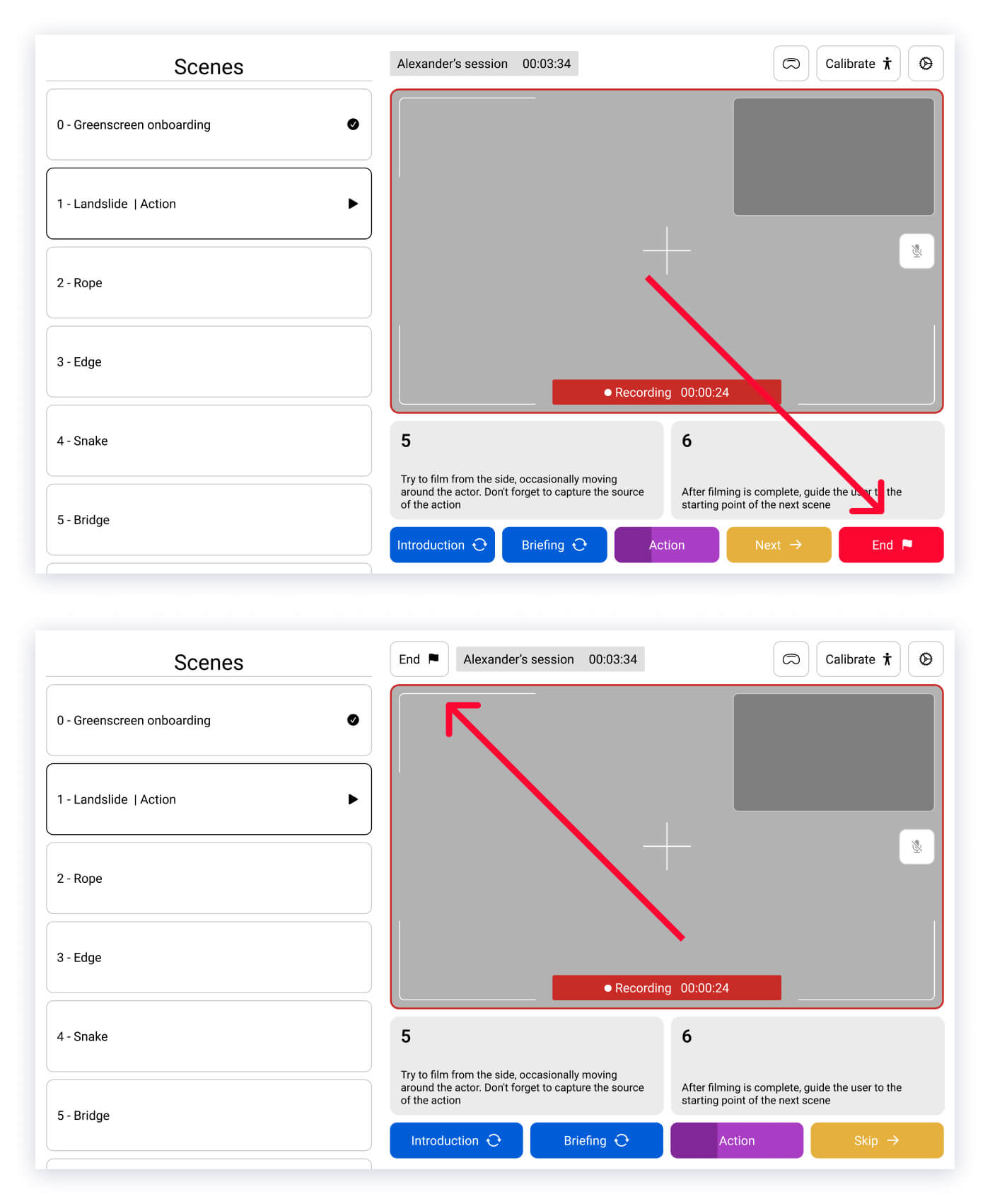
These decisions came from the physical context of use, not just visual preferences.
Designing for Different Operator Roles
Not everyone running an LBE attraction needs the same controls. In this application, the operator monitors the visitor and guides them through the experience, while the manager starts and ends sessions and keeps track of time.
The role-selection screen needed to explain these differences clearly. Alex first drafted the layout himself, then used an AI coding assistant to explore an alternative that fit more information and short role descriptions into the same space.
We adapted the result to the existing components and visual style, refining the typography and spacing.
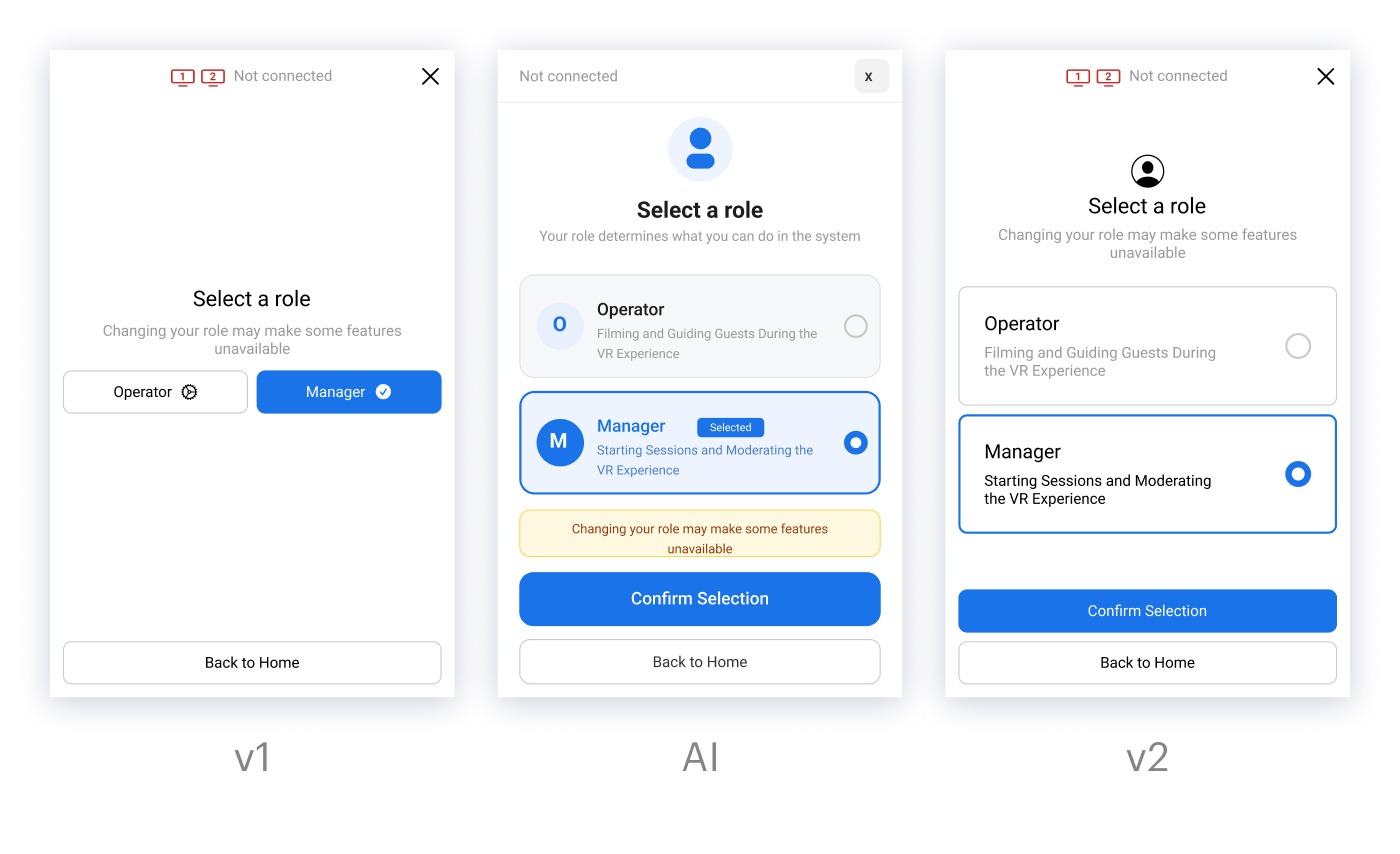
This is how we use AI in design: to explore alternatives and speed up iteration, while keeping the final decisions grounded in the product’s actual needs. Read more about it: https://jet.style/articles-ai
Mapping the Full VR Session Before Finalizing the Screens
The interface had to support the complete session, from setup and launch to scene transitions and completion. We mapped the repeated steps within each scene, including when the next scene should start, when the virtual instructor should appear, and what the operator should do if a visitor gets stuck.
We documented these flows in Figma, keeping the scenario cards close to the screen designs. This helped us check that every interface element supported a real action.
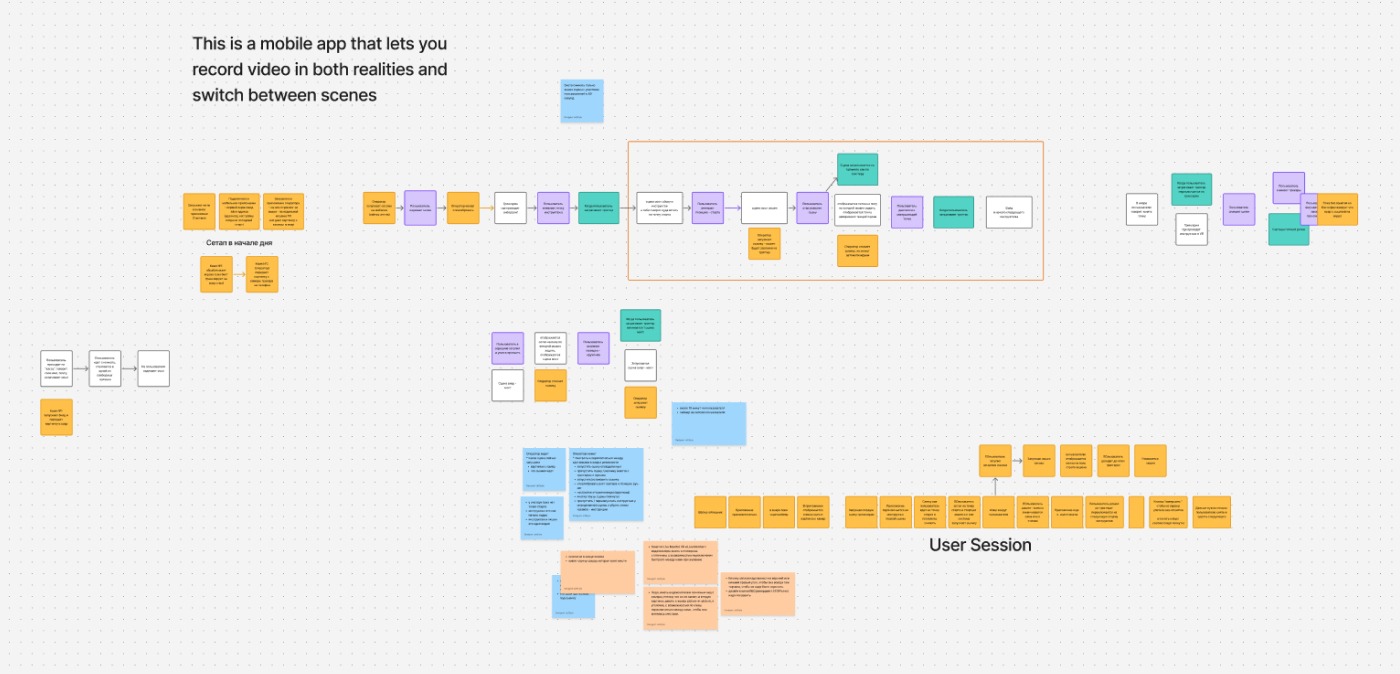
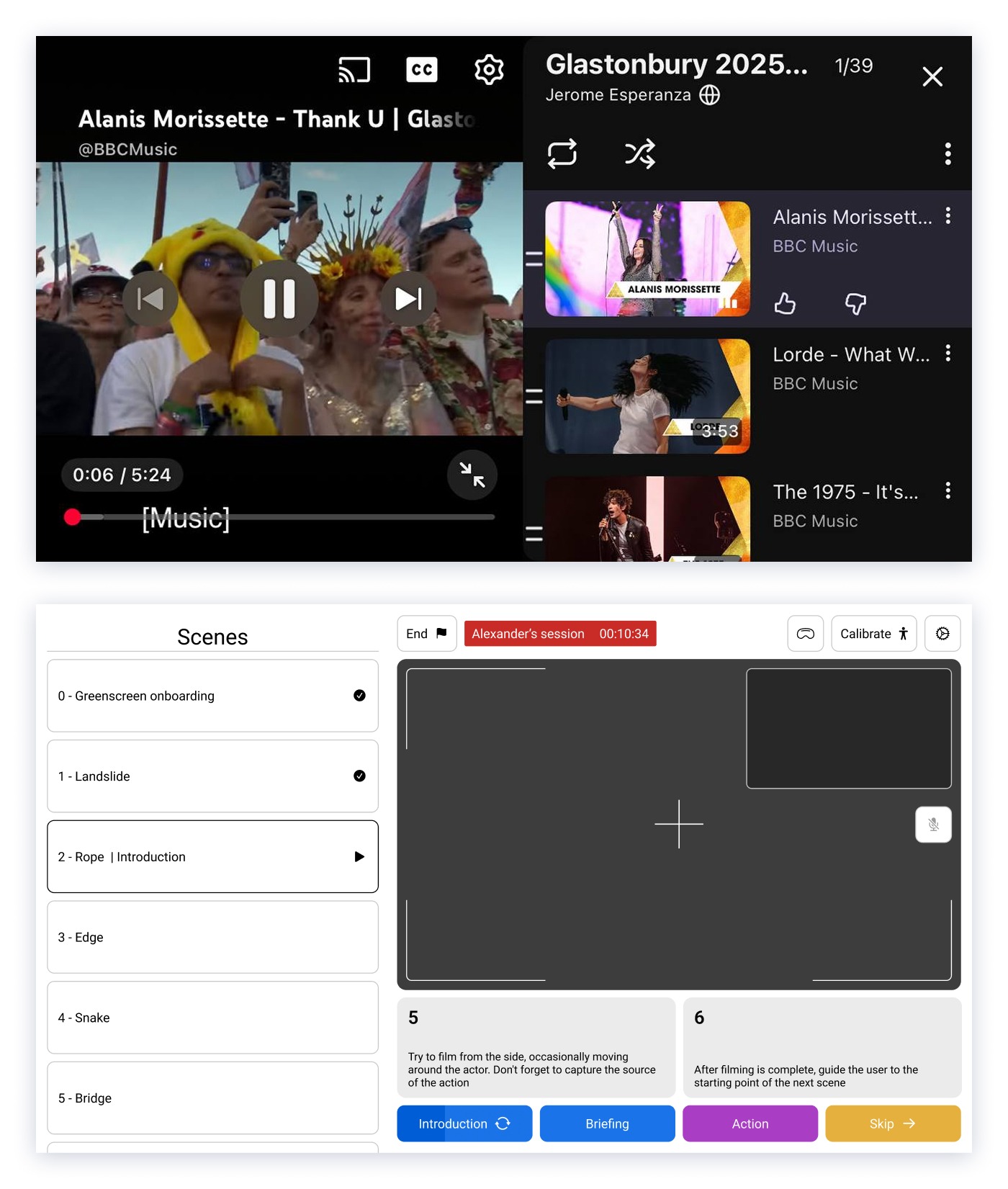
We also needed a predictable interaction pattern for switching between scenes. Since we couldn’t find a direct reference for this type of application, we looked at YouTube playlists as an analogy: scenes form a sequence that operators can navigate without having to learn an entirely new interaction model.
For another perspective on how guidance can be built into the VR experience itself, read our article on narrative design for LBE VR experiences https://jet.style/articles/narrative-design-lbe-vr-experiences
Why UX for Operator Matters for LBE Businesses
A well-designed interface for operators helps staff learn the workflow, manage sessions consistently, and respond to visitors without unnecessary friction. That can mean less time spent on training and fewer interruptions during operation.
For LBE attractions, UX extends beyond the headset. The visitor experience and the tools used to run it need to work together.
At JetStyle, we combine XR design and development expertise with hands-on experience launching LBE attractions alongside The VR Boys. We consider both sides of the experience: what visitors see inside the headset and what venue staff need to make it work.
Planning an LBE VR attraction? Write to us at orders@jet.style to discuss the visitor experience, operational workflow, and interfaces your team will need to run it.