.webp)


Using AI to Maintain BIM VR Documentation
At JetStyle, three things shape the way we work: we develop our own XR products, follow a product-driven approach to development, and actively explore how Artificial Intelligence (AI) can improve our workflows.
Our BIM VR product brings these three interests together. As the product evolves, its documentation needs to keep pace. Keeping everything up to date manually takes time that the team could spend improving the product itself.
We wanted to make documentation easier to create, update, and publish without losing control over its accuracy. So our technical specialist Ivan Knyazev built a workflow in which an AI agent helps maintain the documentation — from analyzing existing knowledge to preparing articles and publishing updates.
Here is what we learned about making this process work.
Why Product Documentation Becomes Hard to Maintain
BIM VR has been evolving for years. Its documentation had accumulated in Notion across more than 120 files, covering product concepts, interface logic, tools, current functionality, and planned changes.
The information was there, but it wasn't yet organized into a single, searchable resource that users could consult to understand the product and complete specific tasks.
Every subsequent product update would bring more work: identifying what had changed, finding the relevant information, updating articles, checking screenshots, and publishing the new version.
We needed a repeatable process for maintaining documentation alongside product development.
How We Built an AI-Assisted Documentation Workflow
We started by exporting our existing Notion materials into Obsidian, preserving the original content as the foundation of a structured knowledge base.
The next step was to use an AI agent to analyze the accumulated materials, summarize what the team already knew, suggest a structure for the documentation, and prioritize the first articles.
For the website, we chose Docsify, a lightweight tool that generates web documentation from Markdown files. It gave us a straightforward way to organize articles, add search and navigation, and publish updates without maintaining a complex content management system.
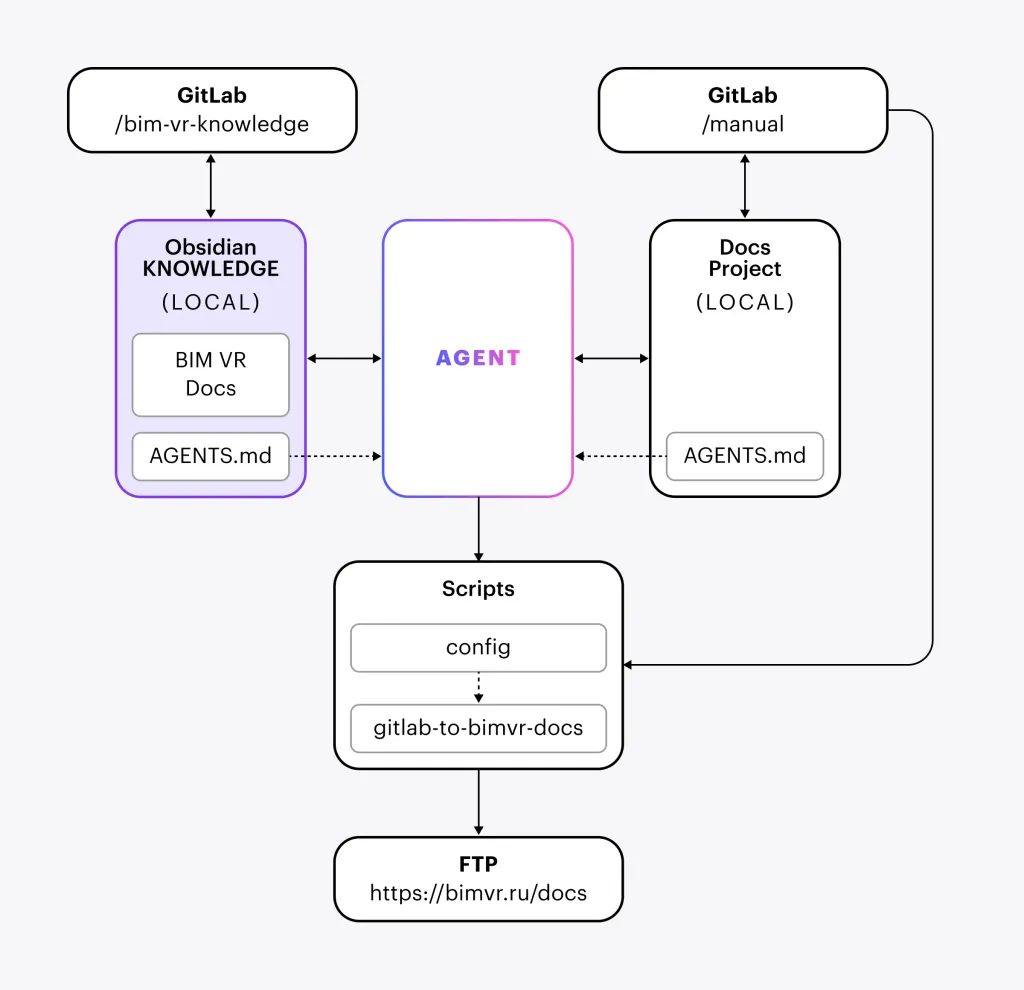
The resulting setup has two separate but connected parts:
- Knowledge base: the source materials, working documents, editorial rules, and approved documentation content.
- Web documentation: the published articles, navigation, layout, and media presented to users.
Both are maintained independently through Git. The knowledge base remains the source of truth for content, while the web project contains the version prepared for publication.
The practical workflow looks like this:
Product update → AI-assisted documentation draft → Human review → Synchronization → Deployment → Publication check
Five Rules for Reliable AI-Generated Documentation
Our experience suggests that the quality of AI-assisted documentation depends as much on the rules around it as on the model itself.
1. Define the source of truth
The agent needs to know which materials describe the current product and which represent earlier ideas or planned features. Without this distinction, it may describe something that is still being developed as if users can already do it.
For BIM VR, the knowledge base is the source of truth for documentation content. The published website is synchronized with approved material from that base.
2. Keep drafts separate from approved articles
Every article has one of three statuses:
- draft — the article is being prepared;
- review — the article needs human review;
- ready — a person has approved the content for publication.
An AI-generated or substantially revised article receives the review status. Automated checks alone cannot make it ready: a person must confirm that it accurately describes the product.
3. Give the agent explicit instructions
We use AGENTS.md files and additional editorial rules to define how the agent should work. These instructions cover information sources, article structure, links, images, and the process for reviewing and publishing changes.
The more clearly the process is defined, the less the agent has to guess — and the more predictable the result becomes.
4. Ask for a proposal before a large change
Instead of asking the agent to rewrite an entire section immediately, start with a narrower request: find the relevant information, outline a proposed article, and suggest where it belongs in the existing documentation.
This creates an extra review step, but gives the team more control over the structure and scope before substantial work begins.
5. Verify the published result
A successful deployment does not automatically mean the documentation is correct. The published pages still need to be checked to confirm that the changes are visible and the website works as expected.
These rules help keep the workflow repeatable as the product and its documentation grow.
What Still Requires Human Judgment?
AI can summarize documents, compare versions, draft articles, and even analyze screenshots or video to help explain an updated interface. But there are decisions it cannot safely make on its own.
1. Only a person can confirm the actual status of a product feature. Design materials may describe a planned interaction, an experiment, or a feature that has already been implemented. The agent can compare the sources, but the team must confirm what users can really do.
2. A person must resolve conflicting information. If two documents describe the same feature differently, the agent should flag the discrepancy rather than silently choose whichever explanation seems more plausible.
3. Human review remains necessary when the documentation changes significantly. A small wording correction is not the same as rewriting instructions for a core workflow. The more a change affects how users understand or operate the product, the more carefully it needs to be checked.
AI can also help when documentation needs new visuals. For example, we can provide screenshots and video clips of an updated tool and ask the agent to use them when revising an existing article. It can compare the materials and draft an explanation of the interface. A person still needs to verify that the explanation matches the actual behavior.
The principle is straightforward: AI can prepare and check information, but people remain responsible for deciding what is true and ready to publish.
AI Should Make Product Teams More Efficient, Not Less Accountable
At JetStyle, we see AI as a way to reduce repetitive work, make accumulated knowledge easier to use, and help teams keep pace with product development. It does not remove the need for product expertise or human judgment.
If you are developing a digital product, the same approach can help make documentation a more manageable part of the development process — rather than a backlog that grows with every release.
Explore more of our practical approaches to AI in product development and creative workflows in JetStyle's AI articles, or learn more about BIM VR.