

Five Design Decisions That Make VR More Inclusive
By JetStyle, in collaboration with Amaia Etxabe Antia, Design Innovation Center (DBZ), Mondragon University.
In Part 1, we explored why designing VR for first-time users is essential and how accessibility should be embedded from the beginning.
Here are five practical design decisions that make VR more inclusive, illustrated with examples from JetStyle’s projects:
1. Reduce interaction burden in VR for first-time users
The more precise, fast, or physically demanding an interaction is, the more users it excludes. Not every VR experience needs complex controller input. In many cases, the better decision is to simplify: fewer inputs, larger targets, forgiving timing, and alternatives such as gaze, hand tracking, or one-handed interaction. Reducing interaction burden does not make an experience less capable; it makes it easier to enter and easier to sustain.
In our VR meditation project, we removed controllers entirely. Users could simply look and select options with gaze, letting them enter the experience quickly and calmly without learning menus or buttons. This was particularly helpful in a location-based retreat context.
2. Make onboarding part of the experience
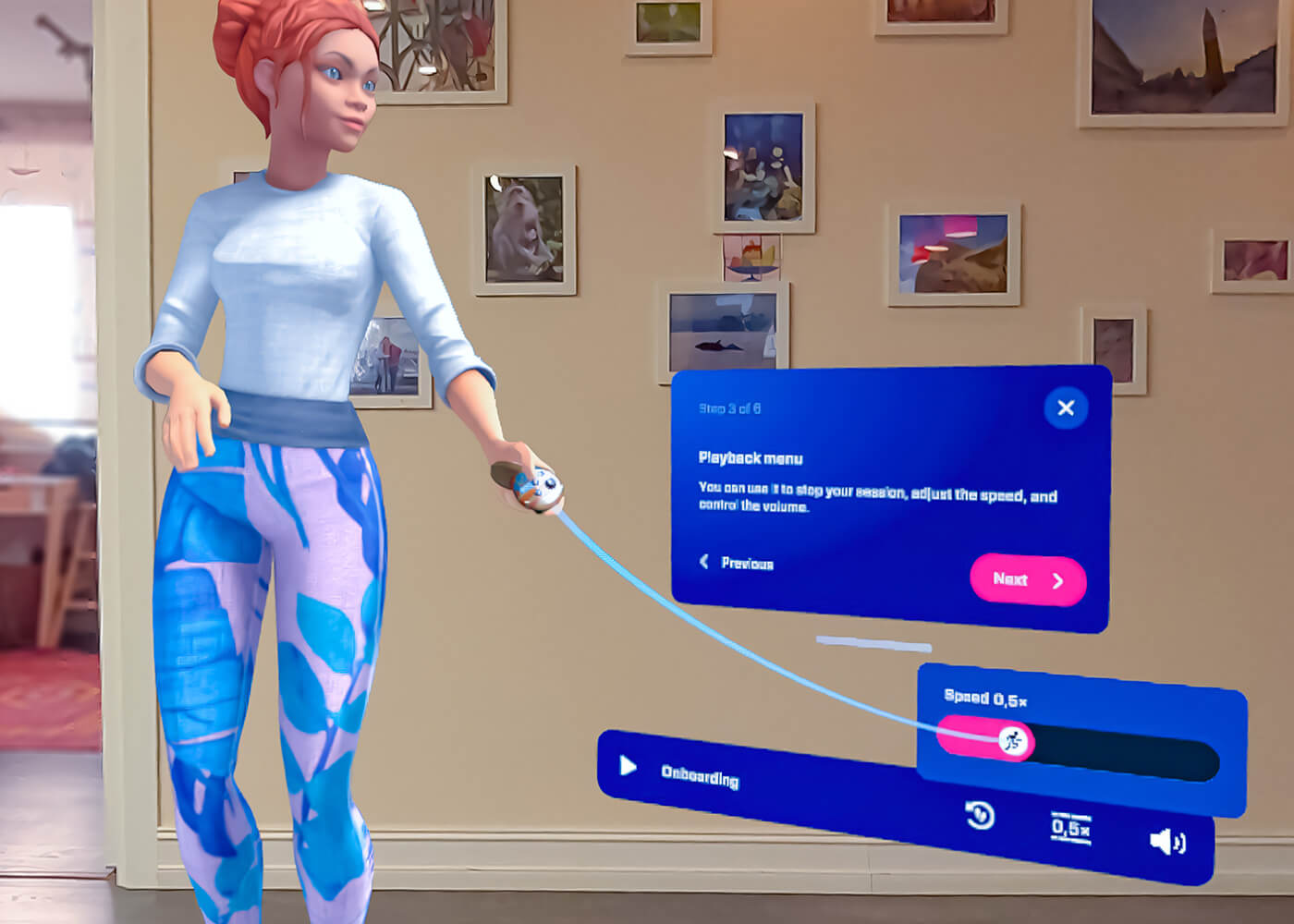
The first minute in VR is critical. If users need a tutorial before they can even begin, many are already behind. Good onboarding is short, contextual, and embedded in the experience itself. It helps users learn by doing, instead of asking them to remember instructions in advance. For first-time users especially, onboarding is not a separate step before the experience starts, it is part of the experience.
In Salsa XR, our extended reality app for learning basic salsa steps, onboarding starts with a short, persona-based XR assistant tutorial. We designed it to be unskippable so beginners could spend three to five minutes adapting to XR navigation before practicing. This allows users to gain confidence at their own pace.
3. Treat comfort as UX, not as an optional extra
Comfort settings are accessibility settings. Seated and standing modes, recentering, snap-turn alternatives, movement choices, stable horizon cues, and spatial anchors all help users stay oriented and in control. Comfort is not separate from immersion, it enables immersion. When users feel secure, they are more likely to remain engaged and confident in the experience.
We carefully design VR interfaces around angular scale and field-of-view considerations to keep elements readable and non-intrusive. In Salsa XR, users can move and rotate the virtual teacher and interface elements to suit their physical space, whether a large living room or a narrow corner, so the experience adapts to them instead of the other way around. More about UX in XR:
4. Support perception through more than one channel
VR experiences too often rely on a single channel: a voice instruction, a distant visual cue, a color change, or a spatial sound. Inclusive design means giving users more than one way to understand what matters: text plus audio, contrast plus iconography, readable scale, clear hierarchy, and cues that do not depend on a single sense.
In Salsa XR, we combine visual guidance, body movement, voice-like instruction, floor markings, and interactive controls. In our LUKAPS XR training demo, trainees receive guidance from an anthropomorphic instructor, voiceover instructions, and visual cues, which allows them to absorb complex technical information without needing a physical mentor.
Video: Victor, the XR assistant:
5. Design for recovery, not perfect performance
Users will get lost. They will miss an instruction. They will select the wrong option. The experience should help them recover instead of punishing them. Repeating instructions, pausing easily, going back, recentering, and offering clear exits are not nice-to-have features. They are trust-building mechanisms.
In both Salsa XR and LUKAPS XR demos, we allow users to repeat actions, receive feedback, and recover from mistakes. In Salsa XR, the autostep feature breaks complex steps into smaller elements so learners progress at their own pace. One Salsa XR tester with Parkinson’s disease reported that practicing with the app helped ease pains, and we are exploring further adaptations for users with mobility challenges.
Quiz practice in VR:
Accessibility can improve what VR makes possible
Accessibility in VR is not only about removing barriers. It can also improve the interaction models the medium depends on. We have seen this pattern many times before: captions, voice input, text-to-speech, and more flexible interaction systems often begin as accessibility features, but they rarely remain niche. Over time, they become standard expectations because they make products easier to understand, easier to use, and more adaptable across contexts. VR can learn from the same pattern.
That matters because immersive environments can offer more than fewer barriers. They can support participation, rehearsal, communication, spatial understanding, and alternative ways of interacting with content in ways that may be difficult, costly, or impossible in other formats. But that potential is not automatic. The same medium can empower or exclude depending on the assumptions built into it. When VR is designed for flexibility, it does not just become more inclusive, it becomes more capable.
Why this matters for adoption
There is still a common assumption that accessibility adds complexity for the benefit of a small group of users. In VR, that assumption is misleading. Accessibility is not a side layer or a niche concern; it is part of what makes immersive experiences usable, learnable, and worth staying in. If VR is meant to scale beyond early adopters, across training, education, healthcare, culture, and work, then accessibility is not a constraint on innovation. It is one of the conditions that makes meaningful adoption possible.
JetStyle can help you plan inclusive XR design, test accessibility features, and optimize onboarding, comfort, and interaction. Book a call with JetStyle to discuss your project and explore inclusive VR design solutions. Book a call