
How to Choose a VR Headset for Work
Choosing a VR headset for work is very different from choosing one for games, movies, or casual apps.
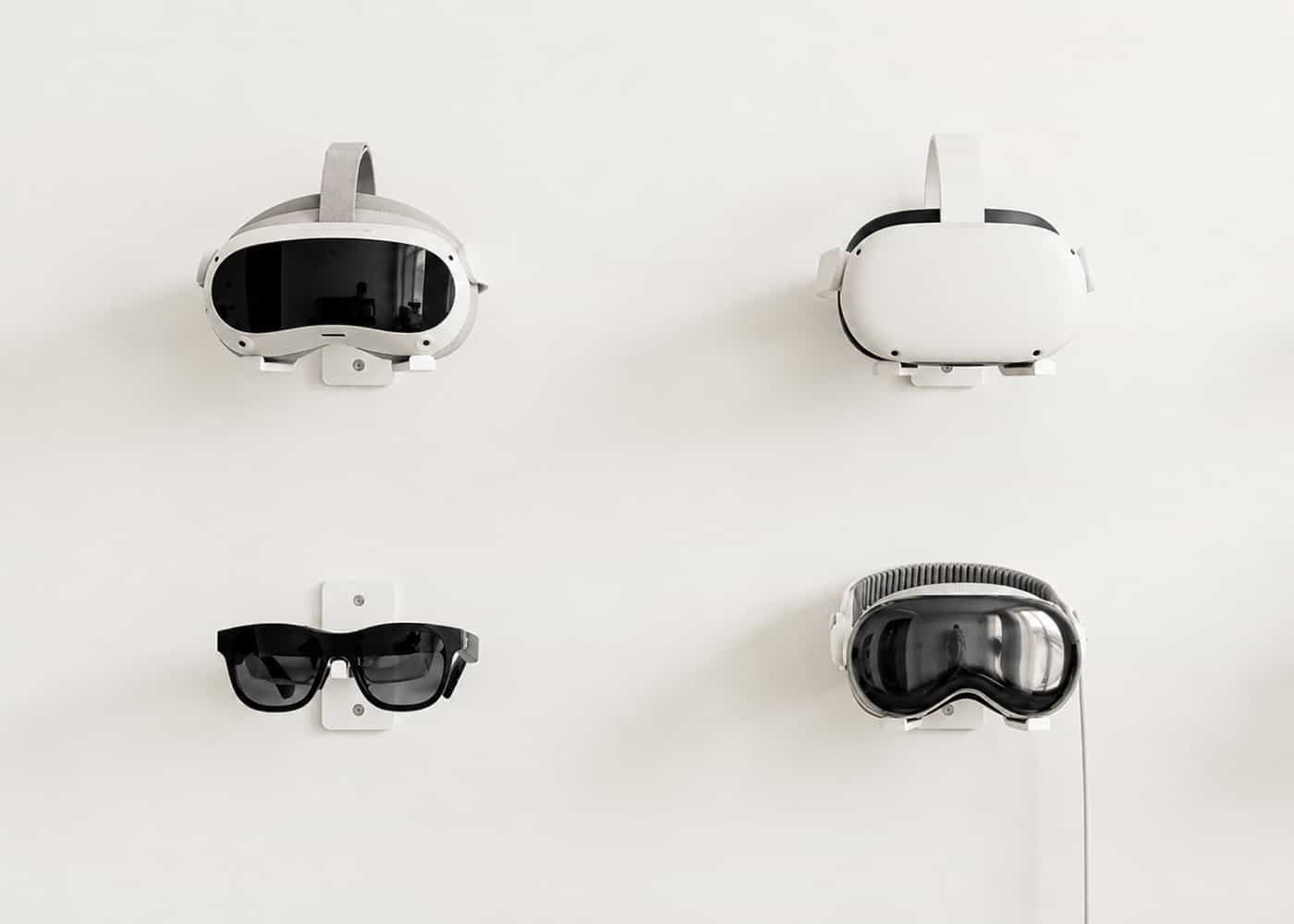
Most up-to-date guides to Virtual Reality (VR) and Extended Reality (XR) devices are written for general users. They are useful if you want a headset for entertainment, but they rarely answer the questions that matter in professional workflows: design supervision, Building Information Modeling (BIM), virtual monitors, large 3D scenes, and VR design reviews.
Alex Markin, co-founder of JetStyle and Head of VR Development, shares what to look at when choosing a headset for work:
Is Meta Quest 3 a good VR headset for professional work?
Meta Quest 3S is a strong mass-market choice, but the lower price comes with older optics and mechanics inherited from Quest 2. If image clarity matters, the better option is the regular Meta Quest 3.
For JetStyle, Meta Quest 3 is the baseline working headset in 2026. Unlike budget versions, it uses quality pancake lenses, which keep the image sharp across the field of view instead of blurring heavily at the edges.
That makes Quest 3 a practical choice for VR design, professional XR testing, and many business tasks where clarity and comfort matter more than the lowest possible price.
Pico 4 Ultra for engineering tasks and heavy 3D scenes
Pico 4 is still one of the most affordable ways to enter VR. But Pico 4 Ultra is a much more serious option for work.
The basic Pico 4 has very limited mixed reality: it relies on a single mono camera. Pico 4 Ultra offers full passthrough and a stronger hardware advantage — 12 GB of Random Access Memory (RAM) compared with 8 GB in many competing headsets.
For heavy BIM models with a lot of geometry, this extra memory can become critical. In situations where other headsets crash or struggle, Pico 4 Ultra can keep the scene running.
That makes it especially relevant for architecture, construction, engineering, and other workflows where large 3D models are part of the job.
Is Apple Vision Pro worth it for work today?
Apple Vision Pro is still expensive, even after the second revision with the powerful M5 processor. In many ways, it still feels like a premium first-generation product.
At the same time, Apple clearly believes in the platform and continues to develop it. The company has recognized the value of competing solutions: PS VR2 controllers can now be officially connected to the headset. A new version of visionOS has also expanded the device’s functionality.
For professional use, Apple Vision Pro is strongest when the budget allows for a premium experience: stable visuals, polished interaction, virtual monitors, and deep macOS integration.
Should engineers wait for Valve Steam Frame?
Valve Steam Frame may be the most promising announcement for engineers and advanced VR users.
Its strongest combination is eye tracking plus wireless PC streaming through foveated streaming. The headset understands where you are looking and directs maximum resources to that point, helping create a sharp image with minimal delay.
The bigger promise is the local launch of Personal Computer Virtual Reality (PCVR) applications in emulation mode directly on the headset, without a computer. The device also supports sideloading Android Package Kit (APK) files from other platforms.
Steam Frame is modular too: users can add color cameras, replace the audio system, and configure the headset for specific tasks.
There is a lot of advanced technology here, but the final verdict depends on the price, which is still unknown.
Valve Index or Sony PS VR2 for work contexts
Valve Index and Sony PS VR2 are not the best investments for professional VR work.
Sony is effectively reducing support, and both systems now feel more like investments in the past than tools for future-facing XR workflows.
They may still be useful in narrow scenarios, but for BIM, VR design, or professional mixed reality, there are better options.
Can lightweight AR glasses replace a monitor for work?
Many people buy lightweight glasses like Xreal Air 2 Ultra as a replacement for a laptop monitor. In practice, this use case is still weak.
First, the screen is semi-transparent. To read text comfortably, you need a plastic cover, which makes the glasses feel much closer to a regular headset.
Second, without perfect spatial tracking, the screen can “float,” which may cause nausea. Reading drawings or small interface text in this mode is not a comfortable professional workflow.
Lightweight AR glasses are still interesting for travel, but they are not ready to replace a full workspace.
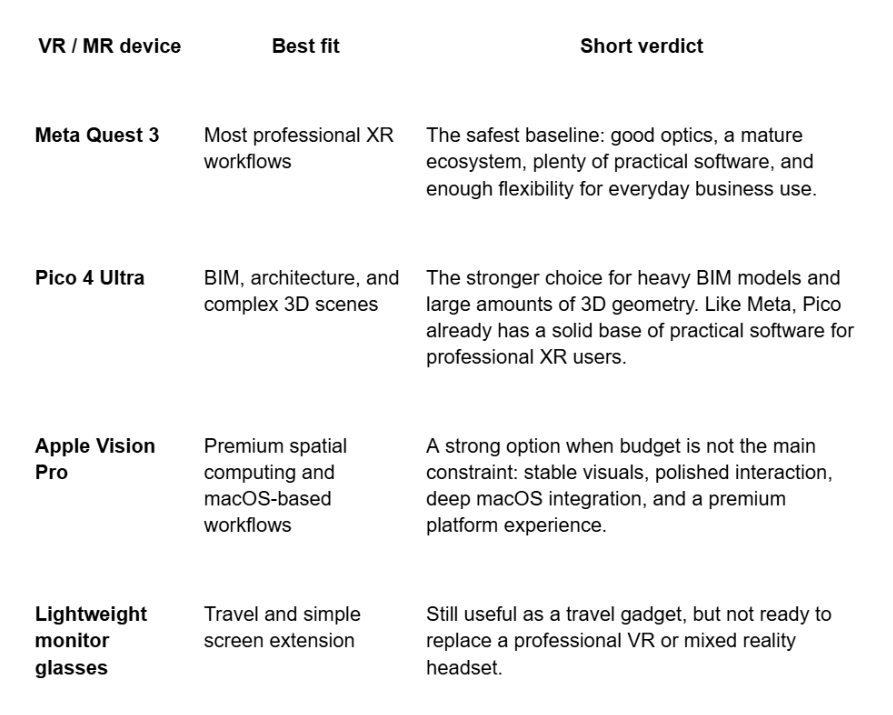
Which VR headset should you buy for work
To summarize:
Want to test XR products before choosing a headset?
If you are choosing hardware for a business XR project, it helps to see the product logic first. At JetStyle, we can show demos of our XR products for education, sales, engineering, industrial training, visitor experiences, and internal collaboration.
This way, you can compare not only headsets, but also real workflows: how a BIM model opens in VR, how a training scenario works, how a sales demo feels, or how a team can use XR to review and discuss a project.
Write to us at orders@jet.style or book a call with JetStyle — and we’ll walk you through the demo, discuss your use case, and help you understand the hardware requirements, production scope, and possible next steps.
XR solutions for businesses by JetStyle: